





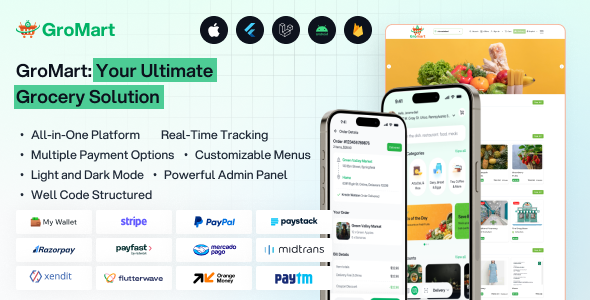
GroMart is a complete, white-label grocery delivery solution built with Flutter for multi-platform support (iOS & Android from a single codebase). It's designed as a multi-vendor marketplace that connects customers with multiple stores, delivery drivers, and an admin panel.
GroMart - Grocery Store App - Grocery Delivery - Multivendor Grocery Flutter App with AI Assistant is a comprehensive mobile application designed for grocery shopping and delivery. It is built using Flutter, a popular UI toolkit for creating natively compiled applications for mobile, web, and desktop from a single codebase.
GroMart - Grocery Store App Features
Grocery Store Platform : Allows multiple vendors to list their grocery products, enabling users to browse and purchase from various stores within one app.
Grocery Delivery Service : Facilitates quick and reliable delivery of groceries directly to customers' doorsteps.
Multivendor Support : Supports multiple vendors, providing a wide range of products and competitive pricing.
AI Assistant Integration : Includes an AI-powered assistant to help users with product searches, recommendations, order tracking, and customer support, enhancing user experience.
AI-Powered Assistant : Integrated AI for smarter automation and improved user experience, helping customers find products or get recommendations .
Voice-to-Text Search : Lets users find restaurants or grocery items instantly by speaking instead of typing .
Personalized Recommendations : The app uses data analytics to offer product suggestions based on past purchases and browsing history .
Multi-Vendor Management : Approve/manage multiple stores, their payouts, and commissions.
Order & Dispatch Logic : Features Firebase Functions for intelligent order dispatching—automatically assigning orders to the nearest available driver and store .
Promotions & Payments : Create coupons, manage payment gateways (Stripe, RazorPay, PayTM, COD), and handle store payouts .
Operational Tools : Bulk product import, product-wise tax settings, packaging charges, and a Maintenance Mode with dynamic control .
Product Management : Full CRUD (Create, Read, Update, Delete) operations for products, inventory, and categories directly from a mobile app or web panel .
Order Management : Accept or reject incoming customer orders in real-time .
Performance Analytics : View earnings, order history, and payment lists specific to their store .
Ride Management : Drivers can go online/offline, accept/reject orders, and get real-time map directions to both the store (pickup) and the customer's address .
Real-time Chat : In-app chat with photo, video, and audio messages between driver and customer .
Delivery History : Complete log of past deliveries and earnings .
Multi-Store Browsing : Customers can shop from multiple stores in one cart or browse a single store .
Advanced Cart Features : Persistent cart (saves items between sessions) and "Reorder in One Click" from order history .
Real-time Tracking : Live map tracking of the driver with estimated arrival time, driver contact info, and location .
Multiple Login Options : Email/Password, Facebook, and SMS OTP verification .
Schedule Delivery : Choose specific delivery time slots for grocery arrival .
Counter Ordering : POS feature available in both Admin and Store panels, allowing cashiers to create orders for walk-in customers .
Technology Stack : Flutter v3.41.2+ (Mobile Apps), Laravel (Backend Web Panels), Firebase (Realtime Database & Functions) .
Supported Platforms : iOS, Android, and Web (Laravel-based) .
Latest Version : v5.6 (March 2026) .
No Native Subscription Model : Currently does not support charging store owners a monthly subscription fee via the panel .
No Delivery Zones : Uses radius-based geofencing but does not support custom "delivery zones" .
Manual Store Payouts : Admins can see owed amounts, but the system currently lacks automated or in-panel payment transfers to stores .
Create an account or sign in to leave a review
There are no reviews to display.