





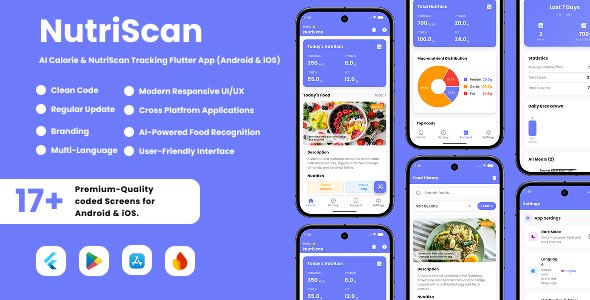
NutriScan – AI Food Nutrition Analysis Flutter App for Android & iOS is a mobile application built using Flutter, designed to help users analyze the nutritional content of food items. Leveraging artificial intelligence (AI), the app enables users to scan food products or input food details to receive detailed nutritional information such as calories, fats, proteins, carbohydrates, vitamins, and minerals. Based on the available information, NutriScan – AI Food Nutrition Analysis Flutter App is a cross-platform mobile template that helps users track their nutrition by scanning food items. It is built with Flutter to run natively on both Android and iOS.
Features of NutriScan Flutter Mobile App
Cross-platform compatibility for both Android and iOS devices
AI-powered food recognition and nutrition analysis
Barcode scanning for quick product identification
Manual input options for homemade or unbarcoded foods
Detailed nutrition reports to support healthy eating choices
User-friendly interface for easy navigation
AI-Powered Food Analysis
Core Nutritional Tracking
Macro & Calorie Counting
Smart TDEE Calculator
Meal & Hydration Logging
Offline-First Architecture
Monetization & Revenue
AdMob Integration
In-App Purchases
GDPR Compliance
User Interface & Experience
Modern Design
Native Dark Mode
Technical Stack
Framework & Language
State Management
API Dependency
Google Gemini API key
Deployment
AI Food Recognition
AI Health Coach (24/7 Chat)
AI Meal Plan Generator
AI-Driven Diet Optimization
AI Food Image Validator
Complete Nutrition Tracking
Health Score System
Smart Image Processing
Premium Subscription System
7-Day Free Trial
Cloud Backup & Sync
Detailed Food History
Advanced Analytics
Smart Notifications
Coin & Reward System
16 Languages Support
AdMob Monetization
Stripe Payment Integration
Offline Mode
Modern UI/UX
Nutrient Deficiency Notification
AI Hydration & Lifestyle Tips
Food History Meal Suggestions
Firebase Cloud Messaging
Create an account or sign in to leave a review
There are no reviews to display.