





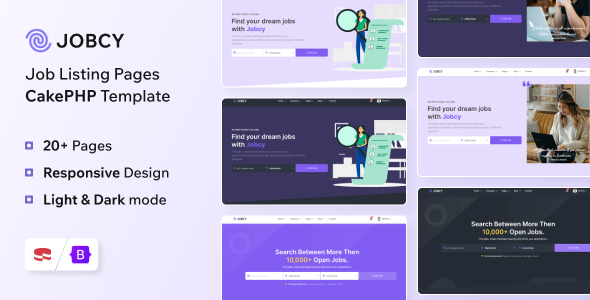
Jobcy - CakePHP Job Board & Listing Template is a powerful and feature-rich web solution designed to streamline the creation of professional job portals and employment websites. Built on the robust CakePHP framework, Jobcy offers a scalable, secure, and highly customizable platform that caters to the needs of job seekers, employers, and website administrators alike.
Whether you're looking to launch a local job board, a niche employment portal, or a comprehensive career platform, Jobcy provides all the essential tools and features to get your site up and running quickly. Its modern, responsive design ensures seamless user experience across desktops, tablets, and smartphones, making it accessible to a global audience.
From user registration and profile management to advanced job search and application processing, Jobcy covers every aspect necessary for a successful job listing website. Employers can post jobs, manage applicants, and promote featured listings, while job seekers can browse, filter, and apply for jobs with ease. The platform also includes an intuitive admin panel, allowing site owners to oversee all operations, manage content, and monetize the platform through paid listings or featured ads.
Designed with flexibility in mind, Jobcy supports multi-language localization, SEO optimization, and integration with popular payment gateways, enabling you to tailor your site to specific markets and user preferences. Its clean code structure and comprehensive documentation make customization straightforward, whether you want to add new features, change the layout, or integrate third-party services.
With Jobcy, you can create a professional, user-friendly, and highly functional job board that attracts both employers and job seekers, helping to connect talent with opportunity efficiently and effectively.
Features List for Jobcy - CakePHP Job Board & Listing Template
Multi-User Registration & Login: Separate registration and login for job seekers and employers.
User Profiles: Customizable profiles for job seekers with resume uploads, skill sets, and application history.
Employer Profiles: Company profiles with logos, descriptions, contact details, and social links.
Dashboard for Users & Employers: Personalized dashboards to manage jobs, applications, resumes, and account settings.
Account Verification & Security: Email confirmation, CAPTCHA, and secure login protocols.
Job Listing & Management
Create, Edit & Delete Jobs: Employers can easily post and manage job listings.
Rich Job Details: Custom fields including job title, description, location, salary, employment type, experience level, and more.
Featured & Urgent Jobs: Highlight important listings for increased visibility.
Job Expiry & Renewal: Set expiry dates for listings and options for renewal.
Save & Bookmark Jobs: Job seekers can save favorite jobs for quick access later.
Job Listing Categories & Tags: Organize jobs into categories and tags for better discoverability.
Advanced Search & Filtering
Keyword Search: Search jobs by title, description, or keywords.
Filter Options: Filter by location, category, salary range, job type, experience level, and more.
Map Integration: Location-based search with Google Maps or other map services.
Sorting Options: Sort results by relevance, date posted, salary, etc.
Application & Resume Management
Apply Online: Job seekers can submit applications directly through listings.
Resume Upload & Management: Upload, update, and manage resumes within profiles.
Application Tracking: Employers can review, shortlist, and manage applications.
Email Notifications: Automatic alerts for new applications, updates, and messages.
Payment & Monetization
Paid Job Listings: Support for paid postings, featured listings, and sponsorships.
Multiple Payment Gateways: Integration with PayPal, Stripe, and other popular payment providers.
Subscription Plans: Monthly or yearly subscription options for employers.
Coupon & Discount Codes: Promotional offers for paid features.
Responsive & User-Friendly Design
Mobile-Friendly Layout: Fully responsive design for desktops, tablets, and smartphones.
Modern & Clean UI: Intuitive interface optimized for user engagement.
Easy Navigation: Clear menus, filters, and search options.
Admin Panel & Management
Comprehensive Dashboard: Manage users, jobs, applications, categories, and site settings.
Moderation & Approval: Approve or reject job postings and user registrations.
Analytics & Reports: Track site performance, user activity, and revenue.
Content Management: Manage pages, FAQs, terms, and policies.
SEO & Performance Optimization
Clean URLs & Meta Tags: SEO-friendly URLs, meta titles, and descriptions.
Fast Loading Speed: Optimized code and assets for quick page loads.
Schema Markup: Implementation of structured data for better search engine results.
Localization & Multi-language Support
Multi-language Ready: Support for multiple languages and easy translation.
Currency Support: Multiple currencies for international markets.
Notifications & Communications
Email Alerts: Notifications for new applications, job postings, and messages.
Contact Forms: Customizable contact pages and inquiry forms.
Messaging System: Internal messaging between job seekers and employers (optional).
Social Media Integration: Share jobs and profiles on social platforms.
CAPTCHA & Security: Protect against spam and bots.
Backup & Security: Regular backups and security enhancements.
Documentation & Support: Detailed setup guides and ongoing support.
Create an account or sign in to leave a review
There are no reviews to display.